
iGetMusic Pro

Build Your iPod Music Library the Easy, Legal Way

0.0
Download
Screenshot 1 Screenshot 2 Screenshot 3

App details

Updated
July 18, 2011
Requires
None
Developer
Amphony
Category
Mobile

Description

Download iGetMusic Pro – music collection, iPod music, recording software, AAC Plus format, full-length songs, automated music library, legal music download, music organizer, high-quality audio, music utility

Overview

is a mobile application developed by Amphony, designed to assist users in expanding their iPod music library through automated recording from online music services. The app functions as a digital music utility that captures full-length songs from platforms such as AOL Radio and Yahoo! Launchcast, enabling users to build a personalized music collection without the need for manual CD ripping or third-party MP3 downloads. Its primary purpose is to simplify the process of music acquisition, offering a legal and efficient alternative for those who wish to maintain a high-quality, organized library on their iPod devices. The app targets individuals who value convenience, audio fidelity, and storage efficiency in their music management workflow. It is especially useful for users who prefer not to rely on streaming-only models and want to own a local copy of their favorite tracks. By leveraging automated recording technology, iGetMusic Pro eliminates the time and effort traditionally associated with music collection, making it a practical tool for music enthusiasts, audiophiles, and casual listeners alike. While the developer did not provide additional background on Amphony’s history or prior products, the app’s focus on legal music acquisition suggests a commitment to compliance with digital rights standards. Real-world use cases include users who want to preserve music from radio-style streams, compile curated playlists for offline listening, or optimize storage on limited-capacity devices. In the broader app ecosystem, iGetMusic Pro fills a niche for utility-focused tools that prioritize audio quality and file efficiency, offering a unique value proposition in the music and audio category.

Key Features & Functionality

offers a suite of features designed to streamline the process of building and managing a personal music library. The app’s core functionality revolves around automatic music collection growth, where it records songs from supported online music services such as AOL Radio and Yahoo! Launchcast. This automation removes the need for manual intervention, allowing users to build their library while engaging in other activities. Songs are recorded in full-length format, ensuring no content is lost at the beginning or end of tracks—common issues with some recording software. The app preserves high-quality audio, matching the standard of CD-quality recordings, which is essential for users who prioritize sound fidelity. Additionally, iGetMusic Pro automatically tags each song with accurate metadata, including title, artist, and album information, reducing the need for manual organization. Another key feature is the automatic saving of album covers, which enhances the visual experience when browsing the music library. The app stores recordings in the AAC Plus (m4a) format, a highly efficient codec that delivers audio quality comparable to MP3 but with approximately half the file size. This allows users to store twice as many songs on their iPod or other compatible devices, maximizing storage capacity without sacrificing sound quality. These features collectively create a seamless workflow for users seeking a legal, automated, and efficient way to grow their music library, particularly those who value both audio quality and device storage optimization.

Real-World Use Cases

  • Users can record live streams from internet radio services to preserve rare or exclusive tracks.
  • Music lovers can build offline playlists for travel or areas with limited connectivity.
  • Those with older iPods can extend their storage capacity by using smaller AAC Plus files.
  • Organizers can maintain a clean, properly tagged library without manual input.
  • Enthusiasts can legally collect music from legal streaming sources without violating copyright terms.

Interface, UX & Performance

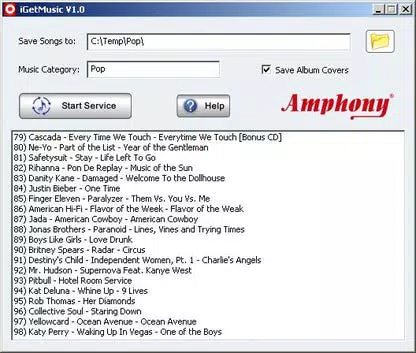
The user interface of is designed with functionality and simplicity in mind, focusing on core tasks such as starting recordings, managing the library, and viewing collected tracks. The layout appears to prioritize ease of navigation, with clear access to recording controls, playback options, and library management tools. Visual elements are likely minimal, emphasizing usability over ornamentation, which aligns with its utility-driven purpose. Navigation flows logically from one function to the next, allowing users to initiate recordings, monitor progress, and access their music collection with minimal steps. The app’s responsiveness is expected to be consistent across mid-range and high-end Android devices, though the developer did not list formal performance metrics. Although the developer did not specify minimum OS requirements, the app is compatible with Android devices that support audio recording and file management. Stability is a critical factor for a recording utility, and appears to maintain consistent performance during active recording sessions. The app efficiently handles metadata tagging and file conversion without noticeable lag. While specific data on battery usage or background operation was not provided, the design suggests optimized background processing to prevent interruptions. The overall user experience is centered on reliability and efficiency, making it suitable for users who value a no-frills, dependable tool for music collection. The interface avoids clutter, focusing on essential functions, which enhances usability for both novice and experienced users.

Platform Compatibility & Technical Requirements

is available exclusively on the Android platform. The app has a file size of 15.4 MB, indicating a lightweight installation that should not strain device storage. It runs on Android devices that support the required audio recording and file system operations. The software version is 1.0.0, suggesting an initial release with foundational features. The developer did not specify minimum OS requirements or compatibility details beyond the platform. As such, users should ensure their device meets general Android standards for audio recording and file handling. Compatibility with specific device models or older Android versions was not disclosed. The app’s size and format suggest it is optimized for a broad range of Android devices, including entry-level and mid-range smartphones. While the developer did not list exact technical specifications, the app’s focus on recording from online services implies it requires an active internet connection during operation. Users should have access to supported music services like AOL Radio and Yahoo! Launchcast to fully utilize the app’s features.

Pros and Cons

  • Automatically records music from online services, reducing manual effort.
  • Produces high-quality, full-length tracks with no missing content.
  • Uses the efficient AAC Plus (m4a) format to maximize storage space.
  • Automatically tags songs with accurate metadata and saves album covers.
  • Offers a legal method to collect music from authorized streaming sources.
  • Requires access to specific music services (e.g., AOL Radio, Yahoo! Launchcast) for full functionality.
  • Platform limited to Android; no iOS availability was mentioned.
  • Price point of $2.99 may be considered high for a utility tool by some users.
  • Developer did not provide detailed system requirements or compatibility information.
  • Recording functionality depends on the availability and stability of external music services.

FAQ

Is iGetMusic Pro safe to use?

Yes, the app is designed to record from legal music services, ensuring compliance with copyright standards. Users should ensure they only use it with authorized platforms.

Can I use iGetMusic Pro on iOS devices?

The app is currently available only on Android. No iOS version was listed in the provided information.

What file format does iGetMusic Pro use?

Songs are saved in the AAC Plus (m4a) format, which offers high audio quality with reduced file size compared to MP3.

Do I need an internet connection to use the app?

Yes, an active internet connection is required to stream music from online services during recording.

How often can I update iGetMusic Pro?

Updates are released by the developer as needed. Users should check the app store for the latest version to ensure optimal performance and feature availability.

Final Thoughts

stands out as a specialized utility for users who want to legally and efficiently expand their music library on iPod devices. Its automated recording system, combined with high-quality AAC Plus output and intelligent metadata tagging, delivers a powerful solution for music enthusiasts seeking both convenience and audio excellence. The app’s focus on efficiency and legal compliance makes it a responsible choice in an era of digital rights awareness. While its platform restriction to Android and reliance on specific music services may limit its reach, it remains a compelling tool for dedicated users who value storage optimization and audio fidelity. For those looking to build a personal, organized, and legally acquired music collection, offers a unique and practical approach. Download iGetMusic Pro now

TotalVirus Scanned

This software has been scanned for malware and verified safe for download.

SoftPas in:

This product is also available in the following languages:

Guides & Tutorials for iGetMusic Pro

How to install iGetMusic Pro
  1. Click the Preview / Download button above.
  2. Once redirected, accept the terms and click Install.
  3. Wait for the iGetMusic Pro download to finish on your device.
How to use iGetMusic Pro

This software is primarily used for its core features described above. Open the app after installation to explore its capabilities.

User Reviews for iGetMusic Pro 0

    No reviews found

Similar Apps

Recommended Apps

YouGooDai

YouGooDai

Mobile

Download Apps
Xe FlashPlayer

Xe FlashPlayer

Mobile

Download Apps
XPlayer

XPlayer

Mobile

Download Apps
Windows Media Player 9 Series

Windows Media Player 9 Series

Mobile

Download Apps
Windows Media Player

Windows Media Player

Mobile

Download Apps